
HVAC estimating software
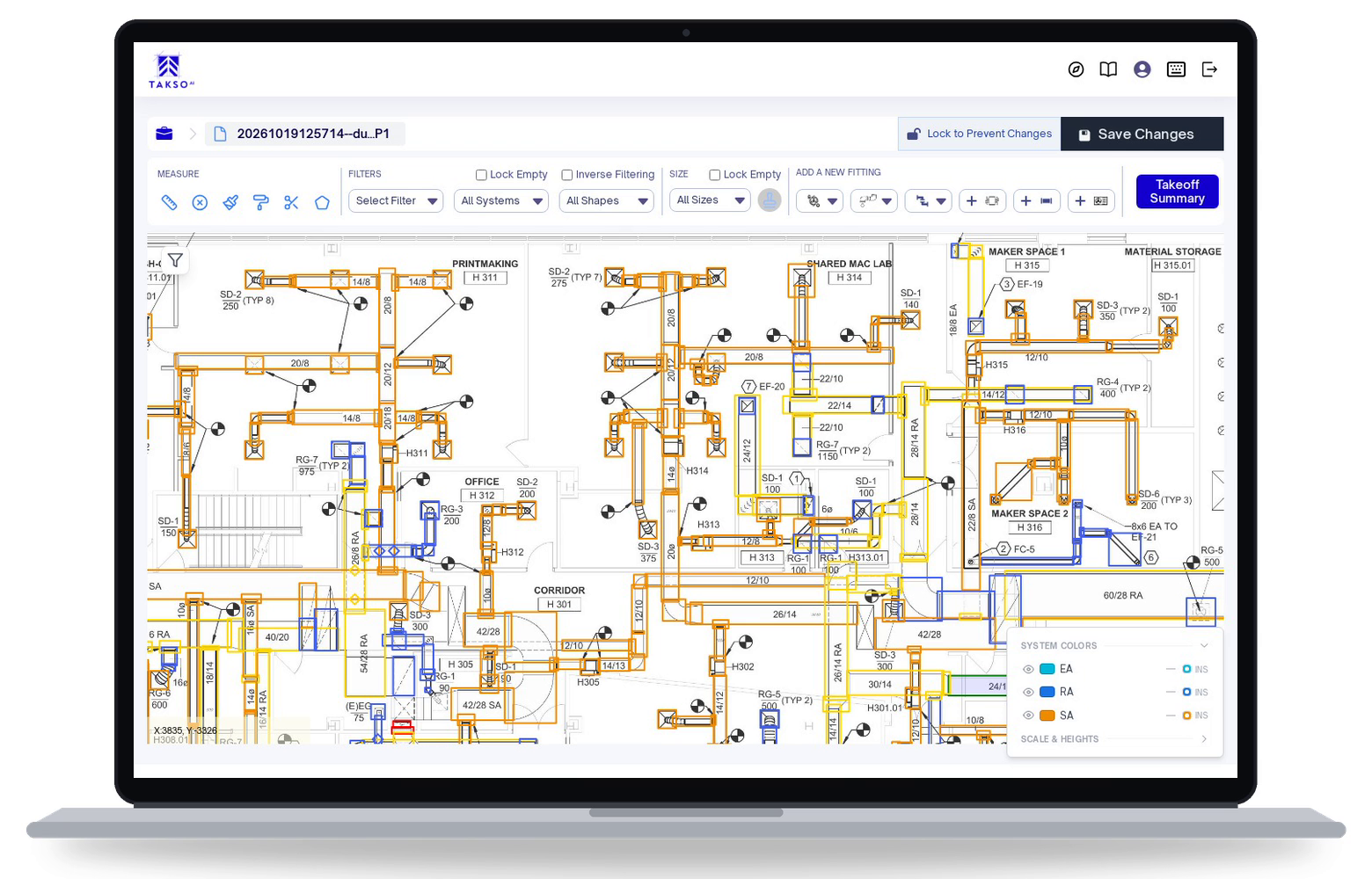
Automate ductwork takeoffs for commercial HVAC bids. TaksoAi detects ducts, fittings, and components in your plans, then lets your estimators review the quantities before pricing the work.
Request a demoKeep your pricing workflow. Export reviewed takeoff quantities to Excel or CSV.
What TaksoAi picks up on HVAC drawings
Ductwork, fittings, air devices, and system information.
Duct runs by size
Elbows and offsets
Reducers
Tees and taps
Diffusers and grilles
Dampers
VAV boxes
S/A, R/A and E/A systems
Upload, review, and export
AI captures the quantities. Your estimator checks the scope. Your existing pricing process turns the takeoff into a bid.
Upload your HVAC plans
Start with your digital drawings and the project information needed for takeoff. TaksoAi scans the plan to identify ductwork and components.
Review the detected scope
Check the AI results on screen. Confirm what belongs in your bid, make adjustments, and review quantities before you export. Access and review takeoffs in the browser so your estimating team can work from the same project information.
Export and price the work
Download the quantities as Excel or CSV files. Use your pricing process to turn the takeoff into an estimate.
COMPARE WORKFLOWS
Three ways to do HVAC takeoffs
Compare manual, on-screen, and AI ductwork takeoff software for measuring duct runs, counting fittings and air devices, and organizing supply, return, and exhaust scope. Traditional tool capabilities vary.
Scroll across to compare all three approaches.
| Capability | Manual takeoff | Traditional on-screen takeoff | TaksoAi |
|---|---|---|---|
| Starting the takeoff | Measure and count items by hand | Trace and count on a digital plan | AI detects ducts, fittings, and components |
| Duct runs by size | Record measurements yourself | Select and measure runs on screen | Review and adjust detected lengths and sizes |
| Fittings and air devices | Count elbows, dampers, diffusers, and grilles | Place and check component counts on the plan | Review detected fittings, air devices, and VAV boxes |
| Separating air systems | Label supply, return, and exhaust in your notes | Assign system labels to the marked runs | Filter and review S/A, R/A, and E/A scope |
| Moving quantities into pricing | Enter quantities in a worksheet | Export options depend on the tool | Export reviewed quantities to Excel or CSV |
FAQ
Before your next HVAC bid
What does TaksoAi take off from HVAC drawings?
TaksoAi detects ductwork, fittings, and HVAC components on commercial plans. Estimators can review lengths, sizes, and system details on screen. In a demo, check the scope your team needs against a representative plan.
Does it produce a fully priced estimate?
The workflow on this page focuses on quantity takeoff. You review the detected quantities, export them, and apply your material and labor pricing in your estimating workflow. The takeoff is an input to the estimate, not a substitute for pricing and scope review.
Can my estimator edit the AI results?
Yes. Your estimator can review and adjust lengths, fittings, components, and system details. AI assists with detection; your team remains responsible for checking quantities and the scope included in the bid.
Will it work with our existing estimating software?
TaksoAi exports takeoff quantities to Excel or CSV. Use the export in your existing pricing process, and confirm your preferred tool's import format during a demo. An export is not a claim of a native integration with every estimating system.
Do we need to install software?
No. TaksoAi is cloud-based and runs in your browser with an internet connection.
More on HVAC takeoffs
Why traditional HVAC takeoffs are broken
Read about the work involved in measuring and counting ductwork manually.
How HVAC estimating software saves time
Read more about takeoff as part of the HVAC estimating process.
Piping takeoff workflow
Review pipe measurements, fittings, valves, and system details.
See your HVAC workflow in TaksoAi
Walk through ductwork detection, estimator review, and quantity exports. Use the demo to check how TaksoAi fits the plans and pricing process your team works with.